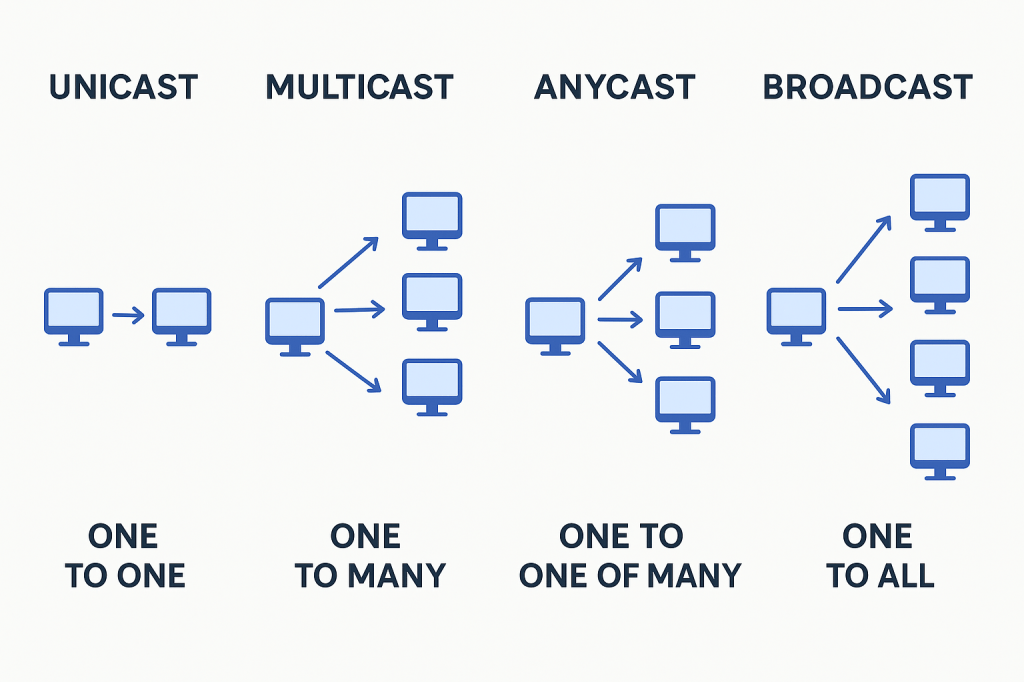
When devices communicate across a network, data doesn’t just float around aimlessly—it follows specific delivery methods depending on the type of communication. Whether you’re browsing the web, streaming a video, or sending routing updates, the underlying communication model determines how data travels.
In this post, we’ll break down the four main types of network communication: unicast, multicast, anycast, and broadcast. Each serves different purposes, has its own strengths, and comes with limitations you need to understand when designing or troubleshooting networks.
Unicast: One-to-One Communication
Unicast is the simplest and most common method of communication on networks. It’s when one system sends data directly to another system. Think of it like sending a letter addressed to a single recipient.
- How it works: One device sends a packet to the IP address of a specific device.
- Use cases:
- Web browsing
- File transfers
- Strengths: Works well for individual communication.
- Limitations: Does not scale efficiently for real-time applications like video streaming, since each recipient requires its own stream.
- Protocols: Works in both IPv4 and IPv6.
Multicast: One-to-Many Communication
Multicast is designed for situations where the same information needs to reach multiple interested systems at once, without flooding the entire network. Think of it like a live TV broadcast—only those who “tune in” receive the feed.
- How it works: A single sender transmits a packet, and only devices that have joined the multicast group will receive it.
- Use cases:
- Streaming multimedia (video conferences, IPTV)
- Stock exchange data feeds
- Dynamic routing protocol updates (e.g., OSPF, EIGRP)
- Strengths: Efficient for one-to-many distribution.
- Limitations: Complex to configure and difficult to scale across large networks.
- Protocols: Supported in IPv4 and extensively used in IPv6.
Anycast: One-to-One-of-Many Communication
Anycast is less commonly discussed but extremely powerful in modern networking. With anycast, a single destination IP address can be assigned to multiple endpoints. The network ensures the data goes to the closest (or “best”) destination based on routing.
- How it works: Multiple devices are configured with the same IP address. Routing protocols determine which device is “closest” from the sender’s perspective.
- Use cases:
- Anycast DNS (queries are answered by the nearest DNS server)
- Content delivery networks (CDNs)
- Load distribution across multiple data centers
- Strengths: Improves redundancy and performance by directing clients to the nearest available endpoint.
- Protocols: Supported in both IPv4 and IPv6.
Broadcast: One-to-All Communication
Broadcast is a communication method where a single packet is delivered to all devices within a broadcast domain. It’s like shouting in a crowded room—everyone hears it, whether they need the information or not.
- How it works: One device sends a broadcast message, and all devices in the local network receive it.
- Use cases:
- ARP (Address Resolution Protocol) requests
- DHCP discovery
- Certain routing updates
- Strengths: Simple way to reach all devices on a network segment.
- Limitations: Can cause unnecessary traffic if overused, and is limited to the local broadcast domain.
- Protocols:
- Used in IPv4
- Not used in IPv6 (replaced by multicast for efficiency).
Wrapping Up
Each communication type—unicast, multicast, anycast, and broadcast—serves a distinct purpose in network design:
- Unicast: Reliable one-to-one delivery (web, email, file sharing).
- Multicast: Efficient one-to-many delivery (streaming, routing updates).
- Anycast: Directs users to the nearest resource (DNS, CDNs).
- Broadcast: One-to-all communication within a local segment (ARP, DHCP).
Understanding how these models work not only helps you troubleshoot issues but also ensures you design networks that scale efficiently and support modern applications.
 Ctrl+Alt+Route
Leave a comment