
Whether you’re studying for the CCNA, Network+, or just diving into network fundamentals, understanding how the network layer and IPv4 addressing work is essential. Layer 3 of the OSI model is where logical addressing and routing take place—and this blog post will help you understand how.
What Happens at the Network Layer?
The network layer (Layer 3) is responsible for routing packets to their destination and providing Quality of Service (QoS). This is why routers operate at this layer. Unlike Layer 2 (Data Link), which uses MAC addresses in a flat structure, Layer 3 uses logical addressing (IP addresses) to break networks into subnets—making them easier to manage, secure, and troubleshoot.
Key Layer 3 Protocols
- IP (Internet Protocol): A connection-less protocol that doesn’t acknowledge packet delivery.
- ICMP (Internet Control Message Protocol): Used for error messaging and operational queries (like ping).
- IPSec: Used for secure IP communications by authenticating and encrypting packets.
IP Header Breakdown
Each IP packet includes a header, which carries essential control information. Here’s a simplified breakdown:
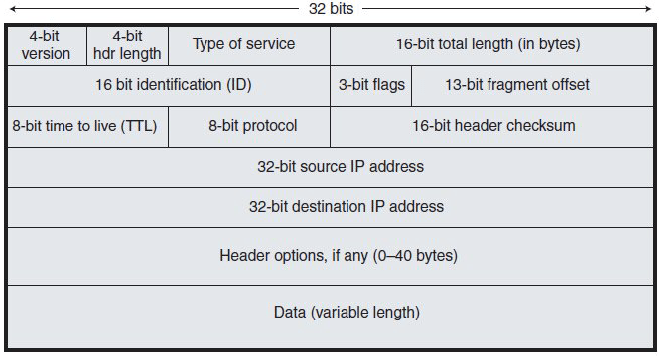
| Field | Description |
|---|---|
| 4-bit version | IPv4 or IPv6 |
| Type of Service (ToS) | QoS info |
| Identification, Flags, Fragment Offset | Used for packet fragmentation |
| TTL (Time to Live) | Limits how many hops a packet can take before it’s discarded |
| Protocol | Specifies Layer 4 protocol (TCP/UDP) |
| Checksum | Ensures header integrity |
| Source and Destination IP | 32-bit addresses for sender and receiver |
| Options and Data | Optional fields and the payload |
IP Traffic Types
There are three main types of IP traffic:
- Unicast: One-to-one communication between devices.
- Broadcast: One-to-all communication within the same subnet.
- Multicast: One-to-many, but only to subscribed or interested hosts.
What is an IPv4 Address?
- IPv4 addresses are 32-bit numbers, written in dotted decimal format (e.g.,
192.168.1.1). - Each address is split into 4 octets, each ranging from
0to255.
To find your IP address you can use the following commands:
- Windows:
ipconfig - Linux:
ifconfig - Cisco Router:
show ip interface brief(Shows all the interfaces and assigned IP’s)
Binary Conversion Basics
Understanding binary helps decode IP addressing and subnetting. For more details and information on subnetting, you can view my article where I covered the basics of subnetting: Beginner’s Guide to Subnetting
Example: Convert 236 to binary
236 in binary is 11101100
| Value | 128 | 64 | 32 | 16 | 8 | 4 | 2 | 1 |
|---|---|---|---|---|---|---|---|---|
| Bit | 1 | 1 | 1 | 0 | 1 | 1 | 0 | 0 |
Tip: Subtract each value from the total until you reach 0 to find binary manually.
How to Calculate an IPv4 Address in Binary
Each octet contains 8 bits:
| Bit Position | 128 | 64 | 32 | 16 | 8 | 4 | 2 | 1 |
|---|---|---|---|---|---|---|---|---|
| Example (All 1’s) | 1 | 1 | 1 | 1 | 1 | 1 | 1 | 1 → 255 |
| Example (All 0’s) | 0 | 0 | 0 | 0 | 0 | 0 | 0 | 0 → 0 |
Subnet Mask and Subnetting
A subnet mask determines which part of the IP is the network portion and which is the host portion.
- Subnet Example:
- IP:
192.168.1.15 - Subnet Mask:
255.255.255.0 - Network Portion:
192.168.1 - Host Portion:
.15
- IP:
Key Points:
- If a device wants to communicate within the same subnet, it sends data directly via switch.
- If the target is on a different subnet, the traffic goes through a router.
- A broadcast address uses
.255in the host portion (e.g.,192.168.1.255).
Valid vs Invalid Subnet Masks:
The subnet mask always begins with contiguous 1’s
11111111.11110000.00000000.00000000(Valid)11101101.11110000.00000000.00000000(Invalid — not contiguous)
Since the subnet mask always begins with contiguous 1’s, it will be 1 to 32 bits long counting from left to right. This allows us to write the subnet mask in slash notation which is more convenient than dotted decimal for network diagrams or in in conversation, such as /16 or /24.
Host Addresses
The host portion identifies individual devices on a subnet:
- Must be unique on a given subnet.
- Do not need to be sequential (e.g., you can have
.1,.20,.50). - Used by PCs, printers, routers, etc.
By understanding how IPv4 addresses, subnet masks, and Layer 3 protocols work together, you’re better equipped to manage, design, and troubleshoot networks effectively.
 Ctrl+Alt+Route
Leave a comment