
The transport layer plays a critical role in networking by enabling the transfer of data between hosts. It ensures end-to-end communication, error recovery, and flow control. In this article, I’ll dive into the functions of the transport layer and explore the two most common protocols: TCP (Transmission Control Protocol) and UDP (User Datagram Protocol).
Key Functions of the Transport Layer
1. Flow Control: Flow control involves regulating the data flow from the sender to ensure that the receiver is not overwhelmed by too much data at once. This process helps maintain a smooth and efficient communication between hosts.
2. Session Multiplexing: Session multiplexing enables a host to support multiple simultaneous sessions over a single link. This allows different applications and services to share the same network connection without interference.
3. Port Numbers: Port numbers are critical for identifying the upper-layer protocols or services. For example, HTTP generally uses port 80, while SMTP uses port 25. The combination of source and destination port numbers helps track individual sessions, ensuring data reaches the correct application on the receiving host.
TCP (Transmission Control Protocol)
TCP is a connection-oriented protocol, which means a connection must be established before data transmission begins. Here are some key characteristics of TCP:
- Connection-Oriented: A reliable connection is established before any data is sent, ensuring bidirectional communication.
- Sequencing: TCP sequences data packets to guarantee they are processed in the correct order, this prevents data corruption or loss.
- Reliability: TCP ensures reliability by requiring the receiving host to send acknowledgements back to the sender. If any segments are lost, they are re-transmitted.
- Flow Control: TCP can manage flow control by adjusting the data transmission rate based on the receiver’s capacity. If the sender transmits too quickly, the receiver signals it to slow down.
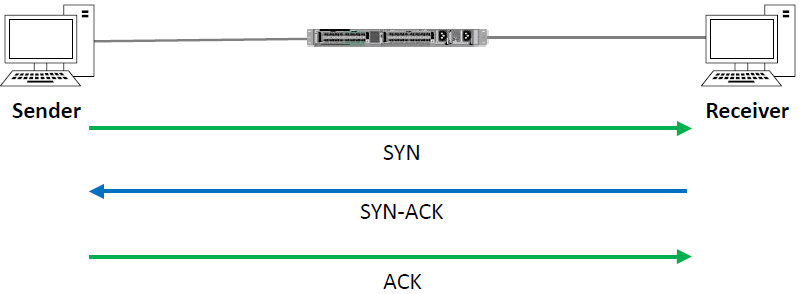
TCP Three-Way Handshake
The three-way handshake is used to establish a connection:
- The sender sends a SYN (synchronize) packet.
- The receiver responds with a SYN-ACK (synchronize-acknowledge) packet.
- The sender sends an ACK (acknowledge) packet, completing the connection setup.
TCP Header
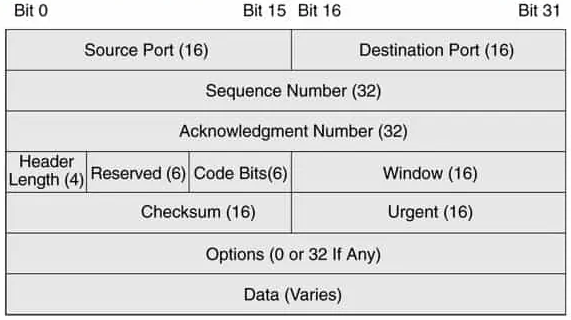
The TCP header contains important fields such as:
- Source Port and Destination Port (16 bits each)
- Sequence Number (32 bits)
- Acknowledgement Number (32 bits)
- Header Length, Reserved, Code Bits, Window Size, Checksum, and Urgent Pointer
- Options (if any)
UDP (User Datagram Protocol)
Unlike TCP, UDP is a connectionless protocol. It provides minimal services, making it faster but less reliable. Key characteristics of UDP include:
- Best Effort Delivery: UDP sends data without establishing a connection, relying on the underlying network for delivery.
- No Sequencing: UDP does not guarantee that packets are received in order.
- No Reliability: The receiving host does not send acknowledgements, and lost packets are not re transmitted.
- No Flow Control: UDP does not regulate the sender’s transmission rate. If error detection and recovery are required, they must be handled by higher layers.
UDP Header
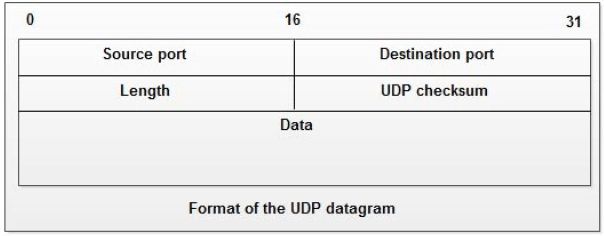
The UDP header includes:
- Source Port and Destination Port (16 bits each)
- Length (16 bits)
- Checksum (16 bits)
- Data (variable length)
Comparing TCP and UDP
TCP and UDP serve different purposes in networking. Below is a comparison:
| Feature | TCP | UDP |
|---|---|---|
| Connection Type | Connection-oriented | Connectionless |
| Reliability | Reliable (acknowledgements sent) | Unreliable (no acknowledgements) |
| Sequencing | Yes | No |
| Flow Control | Yes | No |
| Use Cases | File transfer, web browsing, email | Streaming, VoIP, online gaming |
Use Cases for TCP and UDP
- TCP: Application developers typically choose TCP for applications that require reliability and error correction, such as:
- File Transfer Protocol (FTP) – Port 21
- Secure Shell (SSH) – Port 22
- Hypertext Transfer Protocol (HTTP) – Port 80
- Hypertext Transfer Protocol Secure (HTTPS) – Port 443
- UDP: Real-time applications, where low latency is crucial and occasional data loss is acceptable, often use UDP. Examples include:
- Trivial File Transfer Protocol (TFTP) – Port 69
- Simple Network Management Protocol (SNMP) – Port 161
- Domain Name System (DNS) – Port 53 (can use both TCP and UDP)
- Streaming media and online gaming
 Ctrl+Alt+Route
Leave a comment