
Virtualization is the process of creating a virtual version of something, like a server, storage device, or network resource, instead of relying solely on physical hardware. It’s a fundamental technology in modern IT, and in my opinion, something that every IT professional should know.
Let’s break down the basics of virtualization, its benefits, and how it can impact our IT environments.
What is Virtualization?
At its core, virtualization allows multiple virtual instances to run on a single physical machine. Each virtual instance, or virtual machine (VM), functions as if it were a standalone physical machine, complete with its own operating system and applications. This setup enables organizations to maximize their hardware’s potential while simplifying management.
For instance, virtualization is invaluable in creating isolated environments for testing and development, where developers can build and experiment without impacting live systems(or production). It also plays a significant role in server consolidation, allowing businesses & organizations to host multiple virtual machines on a single server, reducing physical hardware needs and the associated costs.
In disaster recovery scenarios, virtualization simplifies the backup and restoration process, allowing quick duplication of VMs to new hardware. Additionally, legacy applications can run on modern hardware by utilizing virtualization to implement older operating systems.
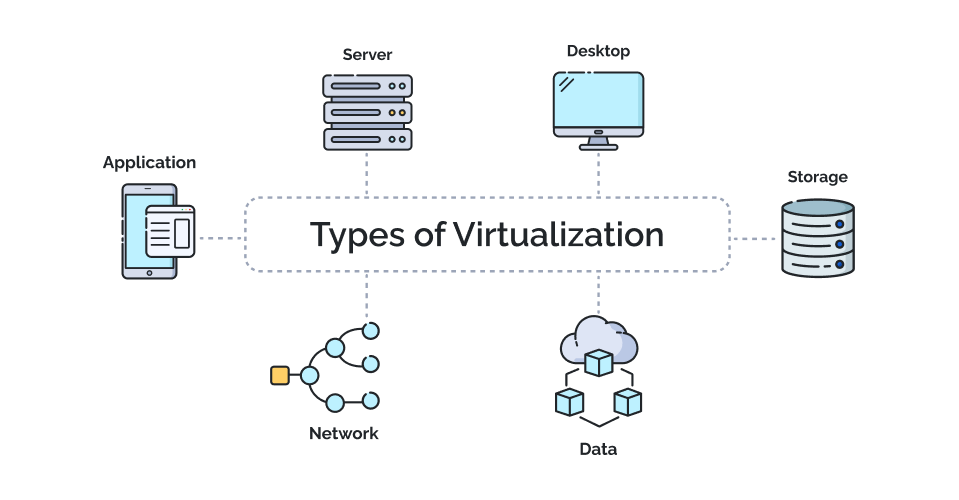
Types of Virtualization
Virtualization comes in many forms, each tailored to specific needs. Here are some common types:
- Server Virtualization Run multiple virtual servers on a single physical server. Each virtual server operates independently, enabling better resource utilization and easier management. For example, you could run Windows, Linux, and other operating systems on one physical server.
- Storage Virtualization Combine multiple physical storage devices into a unified virtual storage pool. This approach simplifies management, optimizes resource allocation, and improves redundancy to handle hardware failures.
- Network Virtualization Abstract and segment network resources to create multiple virtual networks on a single physical infrastructure. It enhances scalability, security, and performance optimization.
- Desktop Virtualization Host desktop operating systems on a centralized server, allowing users to access their desktops from any device. This is particularly useful for remote work environments or organizations managing numerous desktops.
Benefits of Virtualization
Virtualization can be a game-changer due to its advantages:
- Resource Efficiency Optimize hardware usage by running multiple VMs on one server. This maximizes CPU, RAM, and storage utilization, reducing the need for more physical servers.
- Cost Savings Fewer physical machines mean lower hardware costs and energy consumption, leading to significant savings.
- Simplified Management Centralized management platforms streamline the deployment, monitoring, and troubleshooting of VMs.
- Disaster Recovery Virtual machines are easy to back up and restore, making them essential for disaster recovery strategies.
- Scalability Quickly adapt to changing demands by creating or resizing VMs without needing new hardware.
Visualization’s value lies in its ability to bridge the gap between physical hardware limitations and the dynamic needs of most modern IT environments. By abstracting hardware resources and providing flexible, on-demand allocation, virtualization can be a cost effective way to scale your IT environment. Organizations can experiment with new applications, deploy complex workloads, and scale operations seamlessly—all while maintaining cost and energy efficiency. These advantages make virtualization a cornerstone of both traditional and cloud-based infrastructures.
Key Virtualization Technologies
Here’s a quick overview of technologies powering virtualization:
- Hypervisors Software that creates and manages virtual machines. There are two types:
- Type 1 (Bare-metal): Runs directly on hardware (e.g., VMware ESXi, Microsoft Hyper-V).
- Type 2 (Hosted): Runs on top of an operating system (e.g., VMware Workstation, Oracle VirtualBox).
- Virtual Machines (VMs) Isolated environments with virtual hardware, behaving like physical computers.
- Management Platforms Tools to manage virtual resources (e.g., VMware vSphere, Microsoft System Center).

Overview & Resources
Virtualization is a cornerstone of modern IT, offering efficiency, flexibility, and cost savings. Whether you’re managing virtual servers, storage, or desktops, understanding virtualization concepts and tools can elevate your IT skills and open up new opportunities in the industry.
If you’re eager to dive deeper, here are some resources and references to get you started:
- Online Courses
- VMware Learning: Comprehensive courses on VMware products.
- Microsoft Learn: Tutorials and certifications for Hyper-V and related technologies.
- Linux Academy: Focused on open-source and cloud-based virtualization tools.
- Hands-on Labs
- VMware Hands-on Labs: Free labs to explore VMware products.
- Microsoft Evaluation Center: Trial versions of Hyper-V.
- Tools and Platforms
- VMware Workstation, VirtualBox, and Microsoft Hyper-V are great starting points for experimenting with virtualization.
- Community Forums
- Reddit: r/virtualization: Discussions, tips, and news related to virtualization.
 Ctrl+Alt+Route
Leave a comment